Console Visuals (The Complete Edition) for GTA 4: The HelixPedia Review
STATUS: ✅ VERIFIED & STABLE
PERFORMANCE: Light
COMPATIBILITY: Complete Edition (v1.2.0.x) – Requires FusionFix
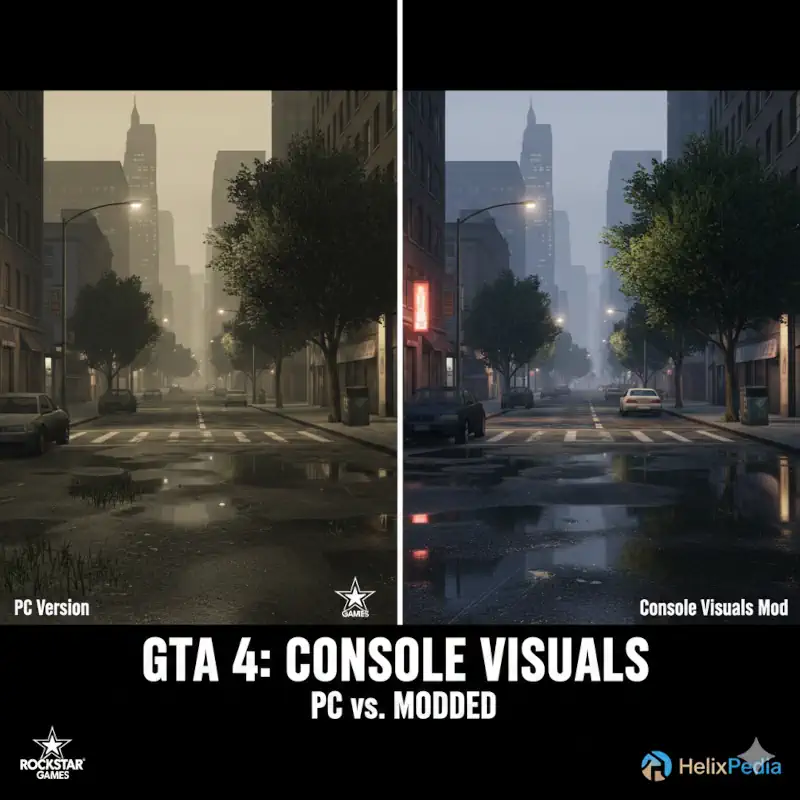
Image – Google Gemini for HelixPedia.com
⚡ HelixPedia Rating & Impressions
- Fun Meter: 🔥🔥🔥🔥🔥 (5/5) – The definitive aesthetic restoration; it’s the “Snyder Cut” of Liberty City visuals.
- Educational Value: 🎓🎓🎓 (3/5) – Highlights the subtle art of asset parity between console and PC architecture.
- Dev-Craft: 🛠️🛠️🛠️🛠️ (4/5) – Modular and non-destructive; utilizes FusionFix’s “Update” folder perfectly.
- Lore-Friendliness: 🎭🎭🎭🎭🎭 (5/5) – Not just lore-friendly, it is lore-accurate to the original 2008 vision.
- Nostalgia Kick: 🕹️🕹️🕹️🕹️🕹️ (5/5) – Pairs the clarity of 4K PC gaming with the warm, atmospheric vibes of the Xbox 360 era.
📝 Console Visuals Review: Why We Picked It
When Rockstar Games brought Grand Theft Auto IV to PC, something was lost in translation. Shadows behaved differently, certain textures were swapped with inferior versions, and the lush vegetation of the console releases was replaced with a bugged, “floating” grass system. Console Visuals (The Complete Edition) is a restorative project led by Tomasak and a team of dedicated preservationists aimed at fixing these 15-year-old discrepancies.
What makes this a “Helix Choice” is its modularity. Rather than a monolithic mod that forces changes on you, it is broken down into specific components: Vegetation, HUD, Clothing, Peds, and even Loading Screens. We particularly love the “Console Vegetation” module, which replaces the sparse, jittery PC trees with higher-resolution assets actually sourced from Max Payne 3 (where Rockstar reused the high-quality versions of the IV assets). It restores the “fullness” of Liberty City’s parks and sidewalks without the flickering issues common in the vanilla PC port.
Beyond just graphics, it fixes “soul” elements like Niko’s fingerless gloves (via clothing modules) and the specific weapon icons that were altered for the PC release. When paired with FusionFix, this mod transforms the Complete Edition into the most technically sound and visually faithful version of the game in existence. It is the bridge between PC performance and console atmosphere.
🎯 Target Audience
- Play this if: You want the PC version to look exactly like the “best version” of the console game, or you find the PC grass and trees to be distracting.
- Similar to: Various Fixes, Potential Grim, Xbox Rain Droplets, Console Shadows restoration.
🛠️ How to Install Console Visuals Guide
- Prerequisite: You MUST have FusionFix installed first, as this mod utilizes the
updatefolder system it provides. - Download & Extract: Download the specific modules you want (e.g.,
Console.Vegetation.zip,Console.Clothing.zip) from the GitHub or GTAForums link. - Deploy: Open the zip files and drag the
updatefolder directly into your main GTA IV directory. It will merge with the FusionFixupdatefolder automatically.
- Friction Rating: Easy (Modular).
📦 Claim Your Mod
To download Console Visuals, use the links below:
- Primary Source: GTAForums (Official Thread)
- Official Mirror: GitHub Releases
- HelixPedia Pro-Tip: Because this mod is modular, you can pick and choose. If you prefer the PC’s high-definition HUD but want the console’s superior trees, only install the
Console.Vegetationzip. This keeps your game stable and your load order lean. - Install FusionFix first, then create an ‘update’ folder. Drop these three mods in Console Visuals – Various Fixes – Potential Grim, and you’ve essentially built your own GTA IV Remaster for $0.