GInput IV for GTA 4: The HelixPedia Review
STATUS: ✅ VERIFIED & STABLE
PERFORMANCE: Light
COMPATIBILITY: GTA IV (1.0.4.0, 1.0.7.0, 1.0.8.0) & Complete Edition
⚡ HelixPedia Rating & Impressions
- Fun Meter: 🔥🔥🔥🔥 (4/5) – It doesn’t add content, but it makes playing the game a joy rather than a chore.
- Educational Value: 🎓🎓🎓 (3/5) – Highlights the evolution of XInput and the shift from “DirectInput” to modern controller standards.
- Dev-Craft: 🛠️🛠️🛠️🛠️🛠️ (5/5) – Silent’s code is legendary; it’s a tiny
.asifile that works with surgical precision. - Lore-Friendliness: 🎭 (1/5) – Technical UI fix; no impact on the story of Liberty City.
- Nostalgia Kick: 🕹️🕹️🕹️🕹️ (4/5) – Restores the exact button prompts and vibration feel of the original Xbox 360 experience.
📝 GInput IV Review: Why We Picked It
Grand Theft Auto IV was released during a transitional era for PC peripherals. While it technically supported controllers, the implementation was often finicky, lacking proper vibration support for many devices and frequently displaying generic button prompts that made QTEs a guessing game. GInput IV by Silent is the gold standard for fixing these input woes, seamlessly integrating modern XInput support into the RAGE engine.
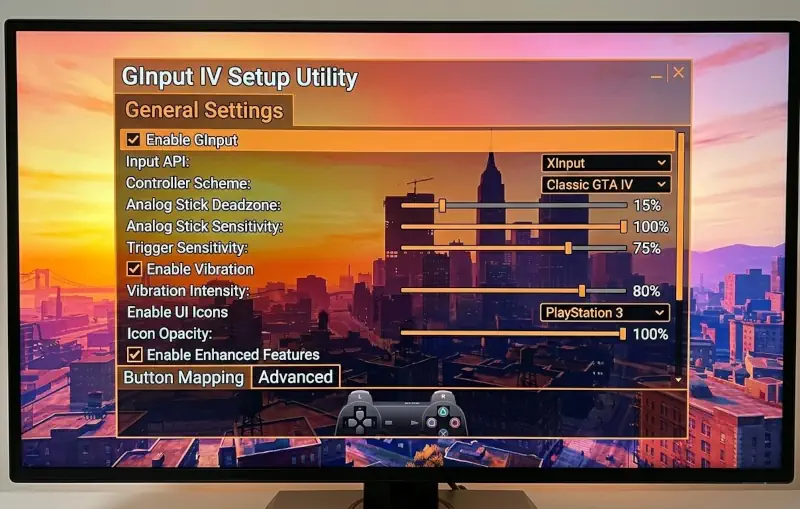
What makes GInput indispensable for the modern HelixPedia setup is its “Plug and Play” nature. It doesn’t just enable a controller; it restores the specific haptic feedback (vibration) that was often missing or buggy on PC and replaces the low-res UI icons with high-quality PlayStation or Xbox buttons. If you are switching between a DualSense and an Xbox Series controller, GInput handles the transition without requiring a restart or a third-party wrapper like DS4Windows.
From a technical standpoint, the “soul” of this mod lies in its ability to override the game’s hardcoded input polling. By hooking into the game’s internal functions, it ensures that your triggers feel responsive and your analog sticks have the correct deadzone. It’s a “set it and forget it” utility that fundamentally changes how the game feels in your hands, making the driving and shooting mechanics feel as tight as they did on hardware in 2008.
🎯 Target Audience
- Play this if: You prefer playing GTA with a controller and are tired of seeing “Button 1” instead of “A” or “Cross.”
- Similar to: GInput for San Andreas/Vice City, Controller Support Fixes.
- Featured on: GTA 4 & EFLC: Top 15 Best Mods Essential Modding Tools & Must-Have Technical Fixes, tagged as recommended.
🛠️ How to Install GInput IV Guide
- Prerequisite: Ensure you have an ASI Loader installed (usually included with FusionFix or the Setup Utility).
- Transfer: Copy
GInputIV.asiand theGInputfolder into your main GTA IV root directory. - Customization: Open
GInputIV.iniif you want to swap between Xbox and PlayStation button prompts manually.
- Friction Rating: Easy.
📦 Claim Your Mod
To download GInput IV, use the links below:
- Primary Source: GTAForums (Official Thread)
- Official Mirror: GTAGarage
Note: While GInput is heavily used for older GTA titles, mainly GTA III, Vice City and San Andreas, for GTA 4, it’s often used in conjunction with X360ce for optimal controller performance.
- HelixPedia Pro-Tip: If you are using a PlayStation controller, GInput allows you to use the “Lightbar” feature to reflect your “Wanted Level”—it will flash Red and Blue when the LCPD is on your tail!