GTA IV Setup Utility for GTA 4: The HelixPedia Review
STATUS: ✅ VERIFIED & STABLE
PERFORMANCE: Regular (Optimization Focused)
COMPATIBILITY: GTA IV: Complete Edition (Steam / Rockstar Launcher / Gold)
⚡ HelixPedia Rating & Impressions
- Fun Meter: 🔥🔥🔥🔥🔥 (5/5) – It’s a utility, not a rocket launcher. But a smooth game is a fun game.
- Educational Value: 🎓🎓🎓🎓 (4/5) – Teaches you exactly why the RAGE engine struggles on modern hardware.
- Dev-Craft: 🛠️🛠️🛠️🛠️🛠️ (5/5) – An incredible piece of automation that replaces hours of manual .ini editing.
- Lore-Friendliness: 🎭 (1/5) – Purely technical; has no impact on Niko’s journey.
- Nostalgia Kick: 🕹️🕹️🕹️ (3/5) – The nostalgia comes when the game actually runs at 60 FPS like you remembered.
📝 GTA IV Setup Utility Review: Why We Picked It
Let’s be honest: GTA IV is a technical disaster on modern PC hardware. Between the stuttering, the broken V-Sync, and the “Out of Video Memory” errors on 8GB+ GPUs, the “Complete Edition” feels anything but complete. The GTA IV Setup Utility is the definitive “first step” for any HelixPedia-approved mod list. It’s a comprehensive tool designed to bridge the gap between 2008 code and 2026 hardware.
What makes this utility a “Must-Have” is its ability to automate the DXVK (DirectX to Vulkan) wrapper. By translating the game’s archaic DirectX 9 calls into Vulkan, it virtually eliminates the micro-stuttering that has plagued the PC port for over a decade. It’s not just about performance, though; the utility handles command-line arguments like -availablevidmem and -nomemrestrict based on your specific GPU, ensuring the game actually recognizes your modern VRAM.
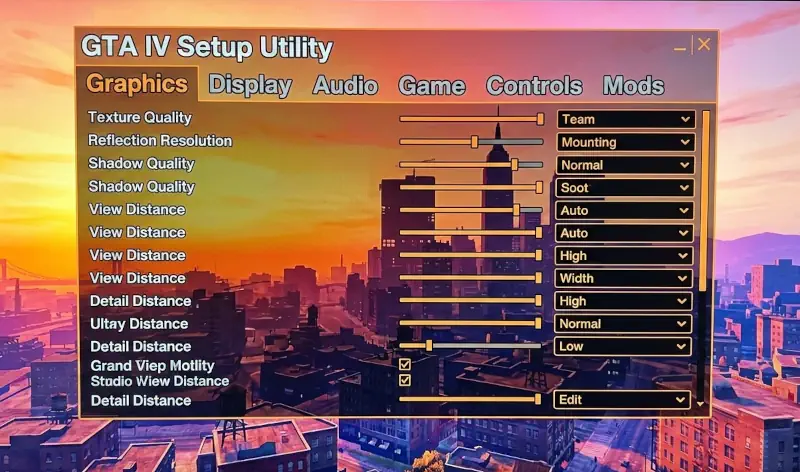
Beyond the performance tweaks, the “Soul” of this utility lies in its accessibility. Historically, fixing GTA IV required a PhD in “Readme.txt” files and manual folder navigation. This tool provides a clean, GUI-driven interface that applies the FusionFix, Various Fixes, and Radio Restorer prerequisites in a single pass. It’s the janitor that cleans up Rockstar’s mess so the player can actually enjoy the masterpiece beneath the grime.
🎯 Target Audience
- Play this if: You have a high-end PC but the game runs like a slide show, or if you are tired of manually editing
commandline.txt. - Similar to: IV FusionFix, DXVK for GTA IV, ZolikaPatch.
- Featured on: GTA 4 & EFLC: Top 15 Best Mods Essential Modding Tools & Must-Have Technical Fixes, tagged as essential.
🛠️ How to Install GTA IV Setup Utility Guide
- Download: Grab the latest
.exefrom the GitHub repository linked below. - Pathing: Run the utility and point it to your
PlayGTAIV.exedirectory. - Configure: Select “Recommended Settings.” We highly suggest enabling the DXVK option if you are on an NVIDIA or AMD card to fix frame-pacing issues.
- Friction Rating: Mid (Requires basic understanding of folder paths).
📦 Claim Your Mod
To download GTA IV Setup Utility, use the links below:
- Primary Source: GitHub (Gillian-Guide)
- Official Mirror: N/A
DOWNLOAD GTA IV SETUP UTILITY NOW
- HelixPedia Pro-Tip: This utility works best on a clean install. If you have old, broken mods, use the “Clean Folder” option within the utility before applying new fixes to avoid conflicting
.dllwrappers.