OpenIV for GTA V: The HelixPedia Review
STATUS: ✅ VERIFIED & STABLE
PERFORMANCE: Light
COMPATIBILITY: v1.0.335.2 to v3351+ (Latest)
⚡ HelixPedia Rating & Impressions
- Fun Meter: 🔥🔥🔥🔥🔥 (5/5) – The ultimate gateway to every vehicle, weapon, and visual overhaul imaginable.
- Educational Value: 🎓🎓🎓🎓 (4/5) – A masterclass in understanding how modern RPF (Rockstar Package Format) structures function.
- Dev-Craft: 🛠️🛠️🛠️🛠️🛠️ (5/5) – Impeccable UI; the standard-bearer for multi-purpose archive editing.
- Lore-Friendliness: 🎭🎭🎭🎭🎭 (5/5) – Strictly a tool; it respects the game’s soul while giving you the keys to the kingdom.
- Nostalgia Kick: 🕹️🕹️🕹️🕹️🕹️ (5/5) – Over a decade of dominance, still the most vital tool in a modder’s kit.
📝 OpenIV Review: Why We Picked It
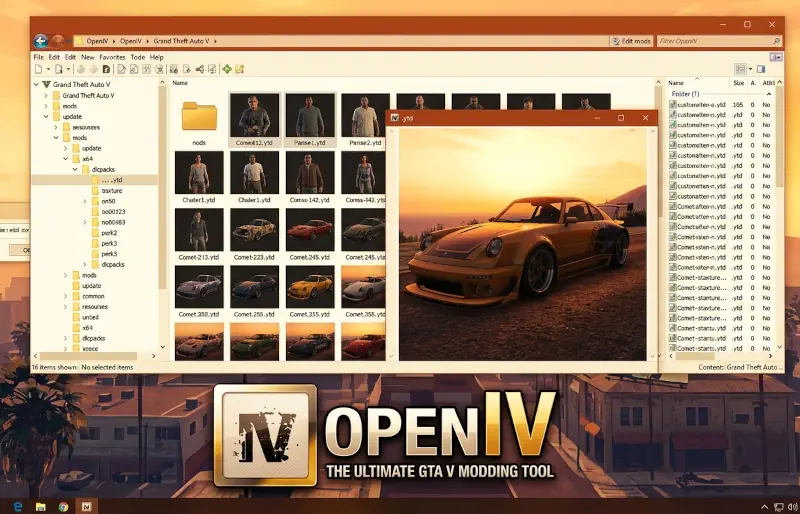
In the ecosystem of Grand Theft Auto V modding, OpenIV isn’t just a utility; it is the cornerstone upon which the entire community is built. While other tools handle scripts or simple trainers, OpenIV operates at the surgical level, allowing users to peel back the layers of the RPF archives to swap textures, edit handling files, and inject high-definition models. It is the bridge between a vanilla experience and a transformed Los Santos that feels truly next-gen.
The “soul” of OpenIV lies in its non-destructive philosophy. Through the implementation of the “mods” folder system, the tool ensures that your original game files remain untouched. By creating a mirrored directory, OpenIV tells the game to read your modified files first, providing a safety net that was revolutionary when it first debuted. This architecture is what makes it a “Dev-Craft” masterpiece—clean, efficient, and remarkably stable even as GTA 5 has evolved through countless “Enhanced” updates.
We chose to feature OpenIV because it remains the most sophisticated multi-purpose editor for the RAGE engine. Whether you are a casual player looking to add a real-world Lamborghini or a developer crafting a total conversion, the technical stability of this tool is unmatched. It handles heavy file management with a lightweight footprint, ensuring that your system resources are dedicated to the game, not the editor.
🎯 Target Audience
- Play this if: You want to install custom cars, weapons, or graphics mods that require RPF file editing.
- Similar to: Codewalker (for map editing), SparkIV (Legacy IV era).
- Featured on: The Ultimate GTA 5 Guide: Best Mods, Must-Have Tools & Essential Fixes, tagged as essential.
🛠️ How to Install OpenIV Guide
- Initialize Setup: Run the
ovisetup.exeand choose your preferred language. Point the installer to your main Grand Theft Auto V directory (whereGTA5.exeis located). - Configure ASI Manager: Open the “Tools” menu in OpenIV and select “ASI Manager.” Install the ASI Loader and OpenIV.asi. This step is crucial for the game to recognize your mods.
- Create the Mods Folder: When prompted by OpenIV after attempting to edit an archive (like
update.rpf), select “Copy to mods folder.” Always perform your edits inside this folder to keep your base game clean for Rockstar’s verification.
- Friction Rating: Easy.
📦 Claim Your Mod
To download OpenIV, use the links below:
- Primary Source: OpenIV Official Site
- Official Mirror: GTA5-Mods Tools
- HelixPedia Pro-Tip: Never attempt to enter GTA Online with OpenIV’s ASI plugins active. Use the “ASI Manager” to uninstall them temporarily; otherwise, the game’s anti-cheat will flag your modified archives, leading to a swift and permanent ban.