VisualV for GTA V: The HelixPedia Review
STATUS: ✅ VERIFIED & STABLE
PERFORMANCE: Light
COMPATIBILITY: v1.0.3717.0 (Legacy) / Enhanced Edition 2026
⚡ HelixPedia Rating & Impressions
- Fun Meter: 🔥🔥🔥🔥🔥 (5/5) – Transforms the atmosphere without breaking the game’s core loop.
- Educational Value: 🎓🎓 (2/5) – A masterclass in how environment lighting affects player mood.
- Dev-Craft: 🛠️🛠️🛠️🛠️🛠️ (5/5) – Exceptionally clean code with minimal impact on frame rates.
- Lore-Friendliness: 🎭🎭🎭🎭🎭 (5/5) – Feels like the “Definitive Edition” Rockstar should have made.
- Nostalgia Kick: 🕹️🕹️🕹️ (3/5) – Refreshes the 2013 classic for a modern hardware era.
📝 VisualV Review: Why We Picked It
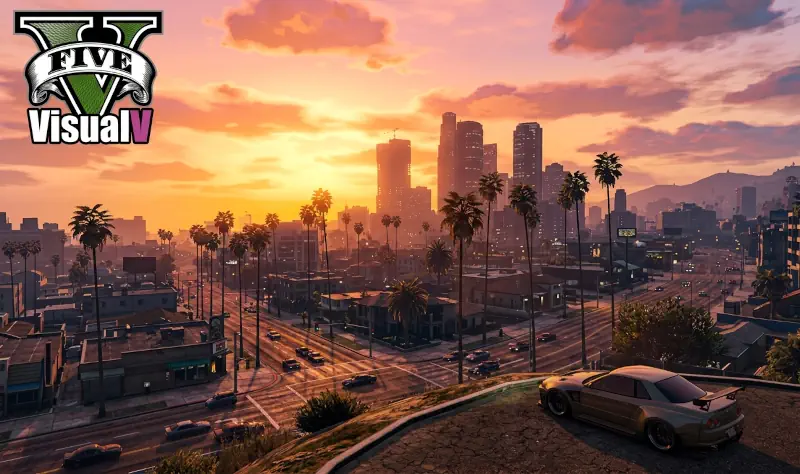
VisualV is not just a graphics mod; it is a surgical refinement of Grand Theft Auto V’s internal engine logic. While many “ultra-realistic” presets rely on heavy Reshade overlays that tank performance, VisualV rewrites the game’s weather files and timecycles from the ground up. The result is a Los Santos that feels tangible. The hazy, washed-out look of the vanilla game is replaced by crisp horizons, corrected moon movements, and volumetric fog that settles into the valleys of Blaine County with haunting realism.
The “soul” of this mod lies in its restraint. The developers, CP and robi29, didn’t just crank up the saturation; they studied Los Angeles reference photography to ensure the light hits the pavement exactly as it does in Southern California. From the removal of chromatic aberration to the fixing of blocky vehicle shadows, every change feels intentional. It provides a clarity that makes high-speed chases through downtown feel more visceral and immersive.
Technically, VisualV is a gold standard for stability. It’s one of the rare overhaul mods that actually fixes rendering bugs within the base game code rather than just layering new effects on top of them. This “fix-first” philosophy ensures that even players on mid-range rigs can enjoy a next-gen experience without the stuttering or crashing often associated with heavy visual modifications.
🎯 Target Audience
- Play this if: You want a more realistic-looking game without sacrificing FPS, or you’re looking for a rock-solid foundation for other mods.
- Similar to: NaturalVision Evolved, QuantV.
- Featured on: The Ultimate GTA 5 Guide: Best Mods, Must-Have Tools & Essential Fixes, tagged as essential.
🛠️ How to Install VisualV Guide
- Prepare OpenIV: Download and install OpenIV, ensuring the “ASI Manager” plugins (ASI Loader and OpenIV.asi) are active.
- One-Click Install: Open the downloaded VisualV archive and run the
VisualV.oivfile. Select “Install” and always choose the “mods” folder to keep your base game files clean. - Optional Add-ons: Browse the “Optional Specials” folder in the archive for features like “Advanced Motion Blur” or “Dynamic Shadows,” and install them via the same OIV method or manual drag-and-drop as specified.
- Friction Rating: Easy.
📦 Claim Your Mod
To download VisualV, use the links below:
- Primary Source: GTA5-Mods.com
- Official Mirror: MediaFire Legacy Vault
- HelixPedia Pro-Tip: VisualV includes a “Procedural Shadows” option. While it makes small objects like trash and cans cast shadows, it is the most performance-heavy part of the mod. Disable this specific add-on if you notice micro-stuttering in dense city areas.