Project 2DFX for GTA San Andreas Classic: The HelixPedia Review
STATUS: ✅ VERIFIED & STABLE
PERFORMANCE: Regular / Intensive (Config Dependent)
COMPATIBILITY: GTA SA v1.0 (Essential) / Works with Open Limit Adjuster
⚡ HelixPedia Rating & Impressions
- Fun Meter: 🔥🔥🔥🔥🔥 (5/5) – Transforms the “foggy box” into a living, breathing state.
- Educational Value: 🎓🎓🎓 (3/5) – Demonstrates the evolution of LOD (Level of Detail) and engine limits.
- Dev-Craft: 🛠️🛠️🛠️🛠️🛠️ (5/5) – Industry-leading optimization from ThirteenAG and the team.
- Lore-Friendliness: 🎭🎭🎭🎭 (4/5) – Stays true to the world, just removes the technical “blinkers.”
- Nostalgia Kick: 🕹️🕹️🕹️🕹️ (4/5) – Feels like how your brain remembered the game looking.
📝 Project 2DFX Review: Why We Picked It
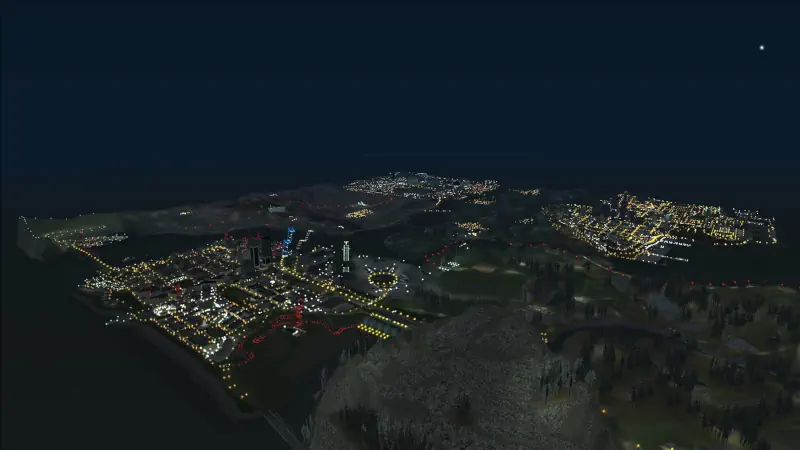
The original Grand Theft Auto: San Andreas relied heavily on “the fog”—a thick, murky veil designed to hide the fact that the PlayStation 2 could only render a few blocks of the city at a time. On modern PCs, this fog feels claustrophobic. Project 2DFX is the cure. It is a set of plugins that adds a massive LOD (Level of Detail) corona effect to the game map, allowing you to see the lights of Las Venturas from the top of Mount Chiliad.
What makes Project 2DFX a staple of the HelixPedia design philosophy is its surgical precision. It doesn’t just “remove fog” (which can often make the map look small and toy-like); instead, it intelligently populates the distant horizon with thousands of light coronas and objects that should be there. At night, the transformation is staggering—the city lights twinkle in the distance, creating a sense of scale that the original developers could only dream of in 2004.
Behind the scenes, the “Dev-Craft” is where this mod shines. It includes an integrated Open Limit Adjuster, which is necessary to prevent the game engine from crashing when it tries to render more objects than it was ever designed to handle. It is highly configurable via an .ini file, allowing users to balance visual splendor with hardware performance.
We picked Project 2DFX because it addresses the single greatest technical limitation of the 3D-era GTA games. It isn’t just a “graphics mod”; it’s an engine expansion that fundamentally changes how you perceive the world of San Andreas. Whether you’re flying a Hydra at 30,000 feet or driving through the countryside, the horizon finally feels infinite.
🎯 Target Audience
- Play this if: You want to eliminate the dated “pop-in” and experience a modern draw distance without losing the classic aesthetic.
- Similar to: Open Limit Adjuster, Fastman92 Limit Adjuster, SkyGfx.
- This mod is part of the essential modding tools and must-have fixes for GTA SA Classic, tagged as recommended.
🛠️ How to Install Project 2DFX Guide
- Essentials First: Ensure you have a v1.0 Downgraded executable and a working ASI Loader (Silent’s ASI Loader).
- Limit Adjuster: Install the included
OpenLimitAdjusterfiles to your root directory to handle the increased object count. - Deploy Mod: Copy
SALodLights.asiand theSALodLightsfolder (containing the.iniand texture files) into your main game folder or use ModLoader for a cleaner setup.
- Friction Rating: Mid (Requires careful configuration for lower-end PCs).
📦 Claim Your Mod
To download Project 2DFX, use the links below:
- Primary Source: FusionFix (Official Site)
- Official Mirror: GitHub (ThirteenAG Releases)
- HelixPedia Pro-Tip: If you experience flickering textures in the distance (z-fighting), open
SALodLights.iniand adjust theDrawDistanceandFogDistancevalues. For the most “Cinematic” look, keep the fog slightly present—it helps maintain the illusion of a massive world while the 2DFX lights pierce through the haze.