OWCS 2026 Stage 1: “Adventure Calls” Twitch Drops & Rewards Guide
🚨 Quick-Scan Status
- Event Status: Active
- Deadline: April 9, 2026
- Wallet Relief: Variable (Contains high-tier limited cosmetics)
- Platforms: PC, PlayStation, Xbox, Nintendo Switch
🛠️ Technical Intel
| Attribute | Specification |
| Game Title | Overwatch 2 |
| Event Type | Esports Viewership Incentive |
| Lore Impact | Cosmetic Only |
| Entry Barrier | Battle.net account linked to Twitch |
📝 Overwatch 2 “Adventure Calls” Event: Overview & Strategy
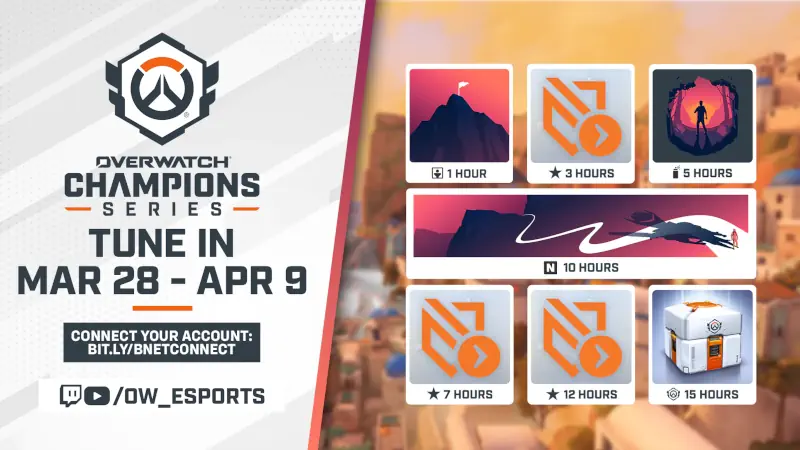
The Overwatch Champions Series (OWCS) 2026 Stage 1 is officially in full swing, and Blizzard has rolled out the “Adventure Calls” viewership campaign. This is the second and final set of drops for the Stage 1 Regular Season, offering players a perfect opportunity to bolster their collection with exclusive esports-themed cosmetics and valuable Battle Pass tier skips.
To ensure you don’t miss out, confirm your Battle.net account is properly linked to your Twitch account via the Battle.net Connections page. Unlike previous events, you no longer need to manually claim one reward to start progressing toward the next; however, you must claim each reward in your Twitch Drops Inventory within 24 hours of the campaign ending (April 9) to ensure they appear in your in-game inventory. Pro-tip: Keep a tab open on an official OWCS broadcast or an authorized co-streamer while you work; progress tracks automatically, and you can switch between eligible channels without resetting your progress.
🎁 Overwatch 2 Loot List: How to Claim “Adventure Calls” Rewards
| Reward Item | Requirement |
| Adventure Calls Player Icon | 1 Hour Watch Time |
| Battle Pass Tier Skip | 3 Hours Watch Time |
| Adventure Calls Spray | 5 Hours Watch Time |
| Battle Pass Tier Skip | 7 Hours Watch Time |
| Adventure Calls Name Card | 10 Hours Watch Time |
| Battle Pass Tier Skip | 12 Hours Watch Time |
| Esports Loot Box | 15 Hours Watch Time |
📊 HelixPedia Efficiency Rating
- Grind Factor: 4/5 (Requires 15 hours of total watch time)
- Grind Fun Meter: 3/5 (Passive; great for background noise while grinding Ranked)
- FOMO Level: High (Esports Loot Boxes contain rare, limited-time skins)
- HelixPedia VTT Ratio: Worthy (The potential for rare skins like Happi Genji makes this highly desirable)
🚀 How to Participate
- Link Accounts: Sign into Battle.net, visit the Connections tab, and link your Twitch account.
- Watch: Tune into the official Overwatch Esports channel or any drops-enabled co-streamer during the Stage 1 schedule.
- Progress: Monitor your progress in the Twitch Drops menu.
- Claim: Ensure you click “Claim” in your Twitch Drops inventory for every earned reward before the April 9 deadline.
- HelixPedia Pro-Tip: Esports Loot Boxes are a goldmine for collectors; they contain legacy items from across Overwatch esports history, including elusive skins like Azure Flame Hanzo and Midas Roadhog—keep an eye out for those gold-tier drops!
Image Credits: blizzard.com