Open Limit Adjuster for GTA 3 Classic: The HelixPedia Review
STATUS: ✅ VERIFIED & STABLE
PERFORMANCE: Light
COMPATIBILITY: GTA III v1.0 / v1.1 (Retail, Steam Classic, & Source Ports)
⚡ HelixPedia Rating & Impressions
- Fun Meter: 🔥🔥🔥🔥 (4/5) – An invisible backbone; you won’t “see” it until it prevents a crash.
- Educational Value: 🎓🎓🎓🎓🎓 (5/5) – The config file is a literal map of the RenderWare engine’s constraints.
- Dev-Craft: 🛠️🛠️🛠️🛠️🛠️ (5/5) – Open-source, modular, and designed to “purge” limits rather than just raise them.
- Lore-Friendliness: 🎭 (1/5) – Zero impact on lore; it simply lets the game world exist more stably.
- Nostalgia Kick: 🕹️🕹️🕹️🕹️ (4/5) – A modern technical necessity for high-end modding.
📝 Open Limit Adjuster Review: Why We Picked It
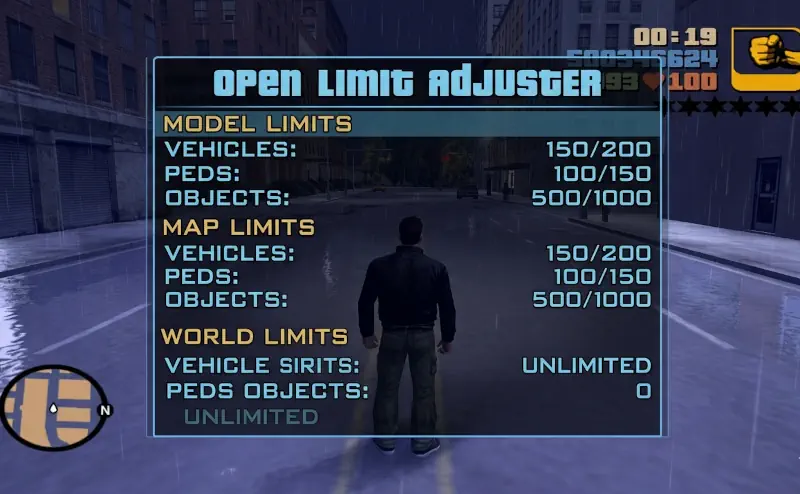
The Open Limit Adjuster (OLA) is the “Silent Guardian” of the GTA III modding world. In its vanilla state, the 2001 engine is a house of cards held together by hardcoded memory limits—limits on how many cars can exist, how many buildings can be rendered simultaneously, and even how much memory is allocated for audio streams. If you try to install a high-definition map overhaul or a massive vehicle pack without OLA, the game won’t just lag; it will simply refuse to boot or will “fake-crash” (freeze) as soon as you enter a dense area.
What makes OLA the “HelixPedia Choice” over legacy adjusters is its philosophy of limit purging. Instead of just bumping a value from 500 to 1000, OLA often reallocates memory dynamically, allowing the game to utilize modern hardware capacities. It is essentially an open-source rewrite of how the game handles its internal tables. This is particularly vital for users running Project2DFX, as the massive increase in draw distance requires a limit adjuster that won’t buckle under the pressure of thousands of additional “Timed Objects.”
The “soul” of this mod is found in the .ini file. It is a masterfully commented document that allows even novice modders to tweak specific engine behaviors—like the frame rate cap or the streaming memory—without touching a single line of code. It is lightweight, efficient, and is the absolute prerequisite for any “Essential” mod list. If you are serious about stable, long-term play in Liberty City, this is not an optional download; it is the foundation.
🎯 Target Audience
- Play this if: You are installing high-res textures, map expansions, or simply want to unlock the 30 FPS cap safely without breaking the physics engine.
- Similar to: Open Limit Adjuster for Vice City and San Andreas, ZolikaPatch and FusionFix (for GTA IV), Packfile Limit Adjuster and HeapAdjuster (for GTA V).
- Featured on: The Ultimate GTA 3 Classic Guide: Best Mods, Must-Have Tools & Essential Fixes, tagged as essential.
🛠️ How to Install Open Limit Adjuster Guide
- Prerequisite: Ensure you have an ASI Loader installed (usually comes with CLEO or SilentPatch).
- Deployment: Extract
III.VC.SA.LimitAdjuster.asiandIII.VC.SA.LimitAdjuster.iniinto your main GTA III root folder. - Configuration: Open the
.inifile with Notepad. Scroll to the[GTA3]section to adjust specific limits likeStreamingMemoryorFrameLimitto your preference.
- Friction Rating: Easy.
📦 Claim Your Mod
To download Open Limit Adjuster, use the links below:
- Primary Source: GitHub (GTAmodding)
- Official Mirror: MixMods
DOWNLOAD OPEN LIMIT ADJUSTER NOW
- HelixPedia Pro-Tip: If your game crashes during the loading bar, check the
StreamingMemoryvalue in the.ini. Setting it too high (e.g., above 2048MB) can actually cause the 32-bit engine to run out of address space and crash. For GTA III, 512MB to 1024MB is usually the “sweet spot” for stability.