ModLoader for GTA 3 Classic: The HelixPedia Review
STATUS: ✅ VERIFIED & STABLE
PERFORMANCE: Regular
COMPATIBILITY: GTA III 1.0 (Retail/Steam Downgraded)
⚡ HelixPedia Rating & Impressions
- Fun Meter: 🔥🔥🔥🔥🔥 (5/5) – The freedom to drag-and-drop mods without breaking your game is pure bliss.
- Educational Value: 🎓🎓🎓🎓 (4/5) – Teaches the importance of file management and modular software architecture.
- Dev-Craft: 🛠️🛠️🛠️🛠️🛠️ (5/5) – Masterpiece by Link/2012; merges data files on the fly with surgical precision.
- Lore-Friendliness: 🎭 (1/5) – A technical shell, but essential for preserving the original game’s visual integrity through fixes.
- Nostalgia Kick: 🕹️🕹️🕹️🕹️🕹️ (5/5) – A modern luxury that makes revisiting the 2001 classic significantly less painful.
📝 ModLoader Review: Why We Picked It
In the “Dark Ages” of GTA modding, installing a new car or texture meant permanently overwriting your gta3.img and praying you made a backup. ModLoader changed the game forever by introducing a non-destructive way to modify Liberty City. It works as an ASI plugin that intercepts the game’s file-loading calls, serving modified files from a dedicated folder instead of the original archives.
The “soul” of ModLoader lies in its hot-swapping capability. You can literally alt-tab, drop a new texture into your mod folder, and see the change reflected in-game instantly without a restart. For developers and players alike, this removes the friction of experimentation. It even handles complex data merging—if two mods want to edit the same handling file, ModLoader merges the lines intelligently rather than forcing a conflict.
We selected ModLoader for the HelixPedia library because it is the ultimate safety net. It keeps your base installation “clean” while allowing for an infinitely customizable experience. If a mod causes a crash, you simply delete its folder. No uninstalls, no registry cleaning, no drama. It is the gold standard for anyone serious about the GTA 3 Classic ecosystem.
🎯 Target Audience
- Play this if: You want to install cars, textures, or maps without touching your original game files.
- Similar to: ModLoader for Vice City and San Andreas, Fusion OverLoader (GTA IV), OpenIV (GTA V), Mod Organizer 2 (for Bethesda games).
- Featured on: The Ultimate GTA 3 Classic Guide: Best Mods, Must-Have Tools & Essential Fixes, tagged as essential.
🛠️ How to Install ModLoader Guide
- Prerequisite: Ensure you have the Ultimate ASI Loader installed in your game directory.
- Deploy: Extract the
modloader.asiand themodloaderfolder into your GTA 3 root directory. - Inject: To add a mod, simply create a new sub-folder inside the
modloaderdirectory (e.g.,modloader/NewSkins/) and drop your mod files there.
- Friction Rating: Mid (Requires ASI Loader knowledge).
📦 Claim Your Mod
To download ModLoader, use the links below:
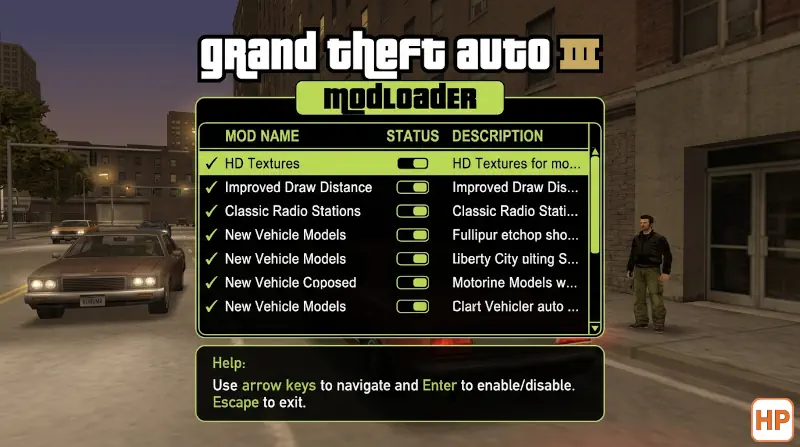
- HelixPedia Pro-Tip: You can use the in-game menu (found under Options > Mod Configuration) to enable or disable specific mods in real-time. This is perfect for identifying which specific mod is causing performance dips without leaving the game.